Thermal Scope Picture-in-Picture Explained: PiP, Digital Zoom, Field of View, and Shot Control
In short, Picture-in-Picture can be of great benefit to a Thermal Scope.
Yes, Picture-in-Picture can be helpful on a thermal scope, but it’s not magic range and it won’t enhance any actual thermal detail.
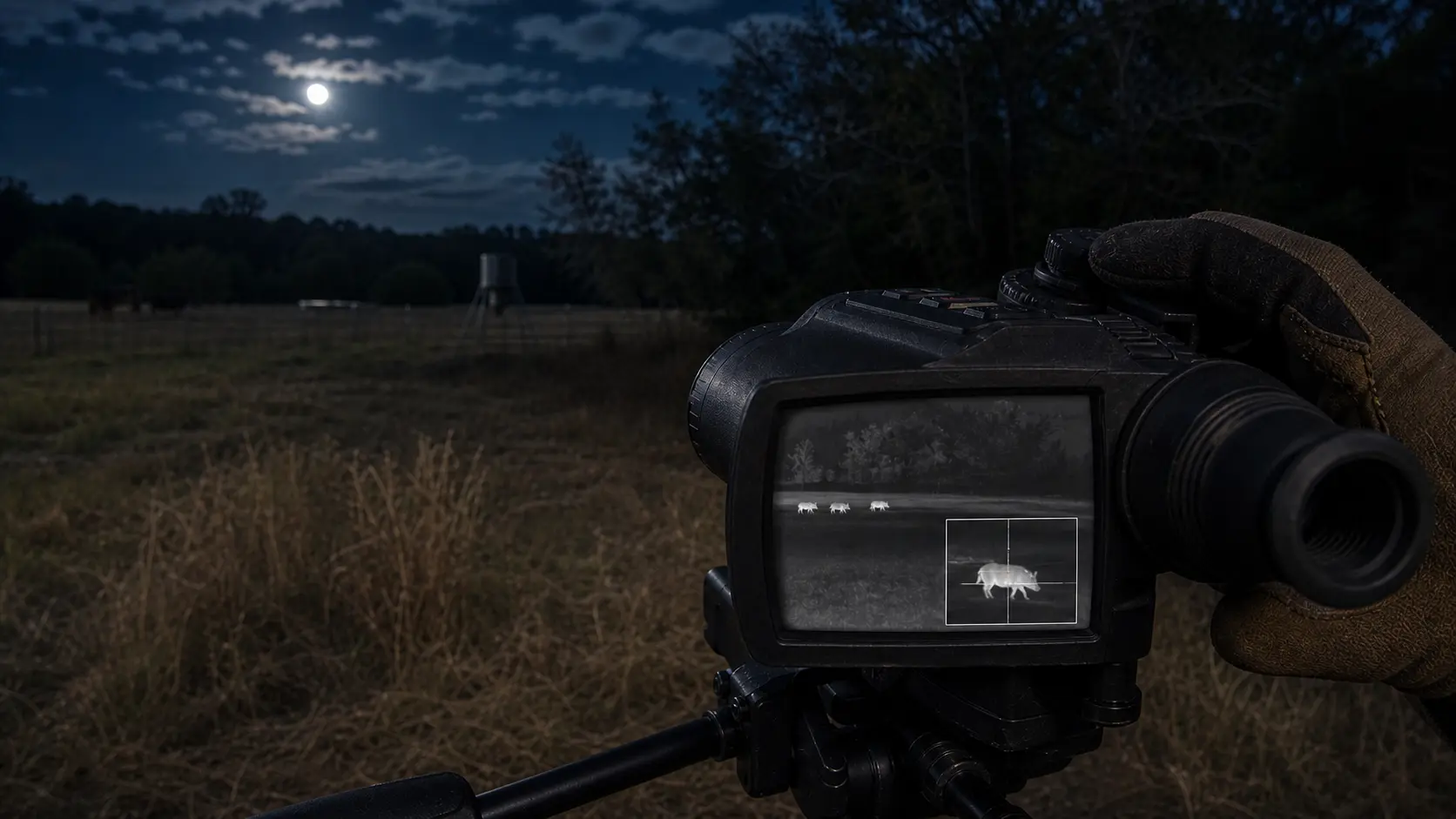
Thermal scope Picture-in-Picture, commonly known as thermal scope PiP, allows the user to see the primary thermal image and a magnified window for aim. The main view will allow you to monitor the field, feeder, brush line, fence or sounder. The smaller thermal scope zoom window allows you to zoom in closer to the region around the reticle.
When used properly, a PiP thermal scope can be a great assist for shot control, target tracking and follow up shots. If not used correctly, it can cause a hunter to fixate on a window and not be able to see what is around the target.
The key word is simple: the important limit is that thermal scope PIP mode typically uses digital magnification. It expands the scope’s current sensor data. It won’t provide extra sensor information, compensate for poor focus, bad weather or make an animal more safe to shoot if it’s subject to uncertainty. But don’t forget that sensor resolution, size of the lens, NETD, refresh rate, focus, display resolution, image settings and the hunter’s judgment are still more important than the name of the feature.
My rule of the field: use PiP only if you have a secure target, a visible image and a secure position. The clean base image may be quicker if animal is near, quick or partly hidden.
What Is Picture-in-Picture on a Thermal Scope?
Picture in Picture on a thermal scope is a mode of display that displays a zoomed in section of the image, in a smaller window, alongside the larger image. On many scopes, that window relates to the center aiming point, but the window size, position, zoom, reticle behavior and recording behavior depends on model, generation, and firmware.
That is an important last point. Not all brands work in the same manner when dealing with PiP. Please consult the manual for the specific SKU before purchase or use in the field.
This is Main View versus PiP Window.
The main view is for thermal scope situational awareness. Helps you to see multiple hogs, coyotes circling, brush, feeders, gates, livestock, roads and safe backstop areas.
The PiP window is a precision window. It provides a magnified view of the focus point to help the hunter make more accurate shots with a thermal scope without sacrificing the overall field of view.
Proper PiP usage is when eyes move back and forth between both images. If your attention is captured completely by the window, it isn’t helping.
Why PiP Exists
Practical awareness can become limited when using the full-screen thermal scope digital zoom which makes the animal appear larger. It can be a problem when the pigs move off and you have to move through the stand, or if recoil makes you lose the target for a coyote cutting across the edge of the stand.
PiP was added to fill the balance between those jobs: maintain the hunt in the primary image while providing you with a more-close thermal scope aiming window.
What is the difference between a PiP and Digital Zoom?
Full screen Digital Zoom will enlarge the entire display. In general, PiP will scale up a small image and display it in a window on top of the main image.
That doesn’t make PiP different in physics, it just makes it different in use. It still functions based on Thermal data. If PiP is on, that’s not a 384 sensor that becomes a 640 sensor. If it’s soft, it’s not sharp, just because it’s big.
PiP Still Uses Existing Sensor Data
Thermal scope sensor resolution determines the maximum level of detail. How much of that detail can actually be taken advantage of is dependent on the lens quality, focus, NETD, processing, weather and image setting.
Modest PiP magnification may be helpful if the base image is clear. If the source image is unclear, PiP can simply enlarge the unclear target image.
Full-Screen Zoom can feel slower because:
Full-screen zoom can be used as long as the target is calm and resting on a solid surface. Animals moving can be slow. A tight view can make it more difficult to get back on a running hog, to see a second animal or to see a coyote circling a stand.
This is why I don’t love to live at high zoom. Read the hunt starting wide enough. Use zoom sparingly when there is a need to see the target and position.
Sometimes it’s more convenient to use PiP than Zoom in full screen.
Sometimes it is more convenient to separate awareness from aiming by using PiP. The main image retains the readability of the field. Window provides a closer aim point.
It’s not always better with PiP though. There are hunters who prefer using a basic base image. Some scope interfaces can be distracting. The best answer is the one that you can operate in the field without problems under shooting pressure.
When using PiP it can also impact a hunter’s field of view and situational awareness.
The field of view of the optical thermal scope itself is not affected by PiP. What it does is keep the larger image looking at a wider portion of the image displayed and then magnifies in a smaller window.
That’s the advantage. It is rare indeed that a night hunt is just one animal, perfectly still, in the middle of a perfect screen.
The broad image assists you to follow the hunt.
The main image will help you to track:
- sounders and several animals
- coyotes entering from the side
- crossing brush or fence lines by animals
- feeders, roads, terrain, backstop
- non-target heat signatures
- movement after recoil
More often than not, that context will be more important than a bigger looking animal.
The Zoom window can be used for aiming.
When the animal is identified, the rifle is stable and a more precise reticle reference is desired, the thermal scope aiming window can be helpful. It can assist on smaller coyotes, larger open field shots and hogs that just continue to rotate the group.
It is a aiming aid only and not a guarantee of identification.
You can also use the PiP Window to block information.
Part of the scene can be obscured by the window. It will cover brush, or another animal, or the edge where movement begins, depending on the interface and animal’s movement.
If information is obstructed or interferes with the decision, switch off the window.
When PiP Helps Most for Hog Hunting
A hog hunting thermal scope must consider the issue of grouping, moving and follow-up decisions. Tunnel Vision is a serious issue when using sounders: you can end up focusing on one of the hogs and forget about the rest. The window can help with the precise hold on the group while PiP can continuously display the group in the main image.
One of the better places for PiP is feeder setups as the scene is predictable and the animals may pause. The main view can still see the feeder area and the window in the view can assist with reticle placement. Modest PiP magnification should be used for thermal scope follow-up shots. Excessive zoom may cause window to become blocky and distracting upon recoil.
When PiP Helps Most for Coyote and Predator Hunting
Some coyote hunting requires a smaller animal and a variety of distances to be covered in a thermal scope. Coyote circles/hangs up, the main view remains open and the PiP window is used to fine tune the hold.
In open fields, PiP can assist if the target has been spotted and the rifle is stabilised. While higher-resolution scopes are generally able to accept a greater amount of digital enlargement, there are limits to any setup. Don’t talk yourself into a shot—use the window to clarify a shot. When a predator comes in close and fast, the clean base magnification view could be faster.
What is the proper magnification to use for PiP?
The best thermal scope magnification for PiP is not one size fits all. The appropriate setting depends on the terrain, the size of the target, the distance to it, the resolution of the sensor, the base magnification and the stability of the position.
It is important to take it easy and gradually increase if necessary.
Do small PiP zoom first. Increase only if the image is still readable and the window really assists. If the animal looks chunky, the reticle seems crowded or your eye avoids the primary view, then you need to step back.
To match PiP with Sensor Resolution and Base Magnification.
Typically, a higher resolution scope will provide greater flexibility in digital magnification when the scope, the display screen, the focus, and the processing are all of good quality. While a low resolution scope might still be a great hunter at low magnification, too much PiP zoom can be blurry.
But base magnification is also important. If the scope is tight, it doesn’t require a lot of PiP. When animals are further away, a small zoom window may work best for a wider, low base mag scope.
Avoid using PiP as a substitute for proper identification.
PiP isn’t sufficient if you don’t know what animal you are dealing with in the main view and you aren’t sure about the shot context. Ethical identification is not the same as a greater heat signature.
PiP, Reticles and Shot Placement.
The thermal scope reticle is different with PiP. The thickness, colour, size of the centre dot and the size of the window and the background contrast all play a role.
Reticle visibility in the PiP window.
The reticle should be seen without obscuring too much of the animal. If visible, a fine aiming point can be helpful. If the reticle is too thick, or too cluttered with other elements, details might be missed in a small window.
A Busy Reticle Can Be Distracting in PiP
The holdover marks, icons, range data and a small window can cause clutter. When it comes to hunting, I prefer a display that I can read quickly. Having a slow shot that has a lot of features in it is not a good thing.
Zero and Holds to the mode you’re using.
Do range work with the settings you plan to hunt with. If you plan to use PiP, check the appearance of the reticle and how the holds feel at this PiP setting. Do not assume all models support zoom and reticle display or overlays in the same manner.
PiP and image quality: how the window can appear better or worse
Some hunters believe that PiP is more pronounced because the target is larger. Others believe that it looks worse because it gets pixelated. Both can happen.
Resolution of the Thermal scope sensor determines the amount of data that is available before zooming. To learn more about the background, check out USA Night Vision on thermal scope sensor size and 384 vs 640 thermal scopes.
Resolution of the thermal scope display has an impact on how "readable" the main image, reticle, menus, and PiP window appear through the oculars. It can’t add sensor detail, but it can help enhance the viewing experience.
You can’t correct a poorly focused image by using PiP. When the objective focus is not correct, the window will be enlarged blur. The window may be more difficult to read if the scope requires NUC calibration, if the brightness, contrast, palette or sharpness setting are not correct for the night. Another common issue with digital enlargement is that the image may appear soft or block-like, particularly if the sensor is not of high resolution, humidity and temperature are high, contrast is low, or the rest is poor.
When to Leave Picture-in-Picture Turned Off
Turn off PiP if it slows you down.
Close brush and fast shots.
For brush, timber, small fields and fast close work, the simple base image might be faster. More than a small zoomed view, movement, openings and context is needed.
New Thermal Users
Before introducing PiP complexity, the new users should master the detection, recognition, identification, focus, NUC, zero, and safe shot judgment.
If the window distracts, simply close it.
When PiP leads to hesitation or tunnel vision, it’s the wrong time for PiP.
This is how to practice with PiP prior to a hunt:
Practice before the hunt and not on the first live animal. Turn on/off PiP and adjust the magnification, read the reticle and verify zero or holds at the setting you will use at the range.
Next, try it at real hunting setups: from sticks, a tripod, blind, sitting, standing and/or from vehicle rests (where legal). The bench doesn’t necessarily match the field. Try out in the dark using gloves to see if controls work easily without looking.
Exercise movement tracking, if safe and legal. The idea is to maintain the use of the main image while the window will complement the shot.
When considering purchasing a PiP, one of the most pressing questions is whether it’s worth the premium price.
Just because a scope has PiP doesn’t mean it’s a good scope to buy.
Pay attention to PiP if…
If you hunt hog sounders, mixed hog and coyote habitat, open fields with smaller targets, or anything where you want a large main image with a small magnified aiming window, then PiP will be appreciated.
It would make the most sense once all the core specs are already solid: sensor, lens, NETD, refresh rate, display, focus, battery, mount, controls and recoil rating.
Never purchase a Scope because of PiP!
However, PiP can’t improve on poor thermal scope image quality, weak focus, suboptimal refresh rate, limited battery, bad controls, or poor zero confidence. First and foremost is CORE performance.
The model name is similar but be sure to compare the exact model.
Check PiP position in the exact model, size of the window, zoom levels, how the reticle behaves, button controls, and whether PiP affects recording or screenshots. These details vary.
Field Checklist for PiP Setup
- Make sure you have a model that supports PiP and the firmware version is compatible with it.
- Practice activating and de-activating PiP without searching for the PiP settings.
- Make small PiP magnifications at first.
- Make sure the reticle is visible in PiP window.
- Test if PiP has an impact on recordings or screenshots.
- Check and maintain zeros and holds at settings used.
- Try to follow the moves in both views.
- If not seeing important information in the scene, turn PiP off.
- Focus target ID, backstop, regulations and shot safety over the use of features.
Final Takeaway
One of the more useful smart features (if used properly) is a thermal scope picture in picture. It can assist the hunter in maintaining "field awareness" while he or she is using a magnified aiming window to control the shot.
However, PiP remains a digital magnified image within a window. It doesn’t provide sensor detail or take the place of judgment. Align it with your environment, animal handling, thermal scope magnification, sensor resolution, FOV and routine. For when it helps, use it. Turn it off when it distracts you.
Can You Use a Thermal Scope During the Day? Daylight Use/Sun Safety and Zeroing Tips.
Night Vision Range Explained: Detection, Recognition, Identification, and Real Hunting Distance
How to Set Up an IR Illuminator for Night Vision: Placement, Beam Width, and Field Mistakes