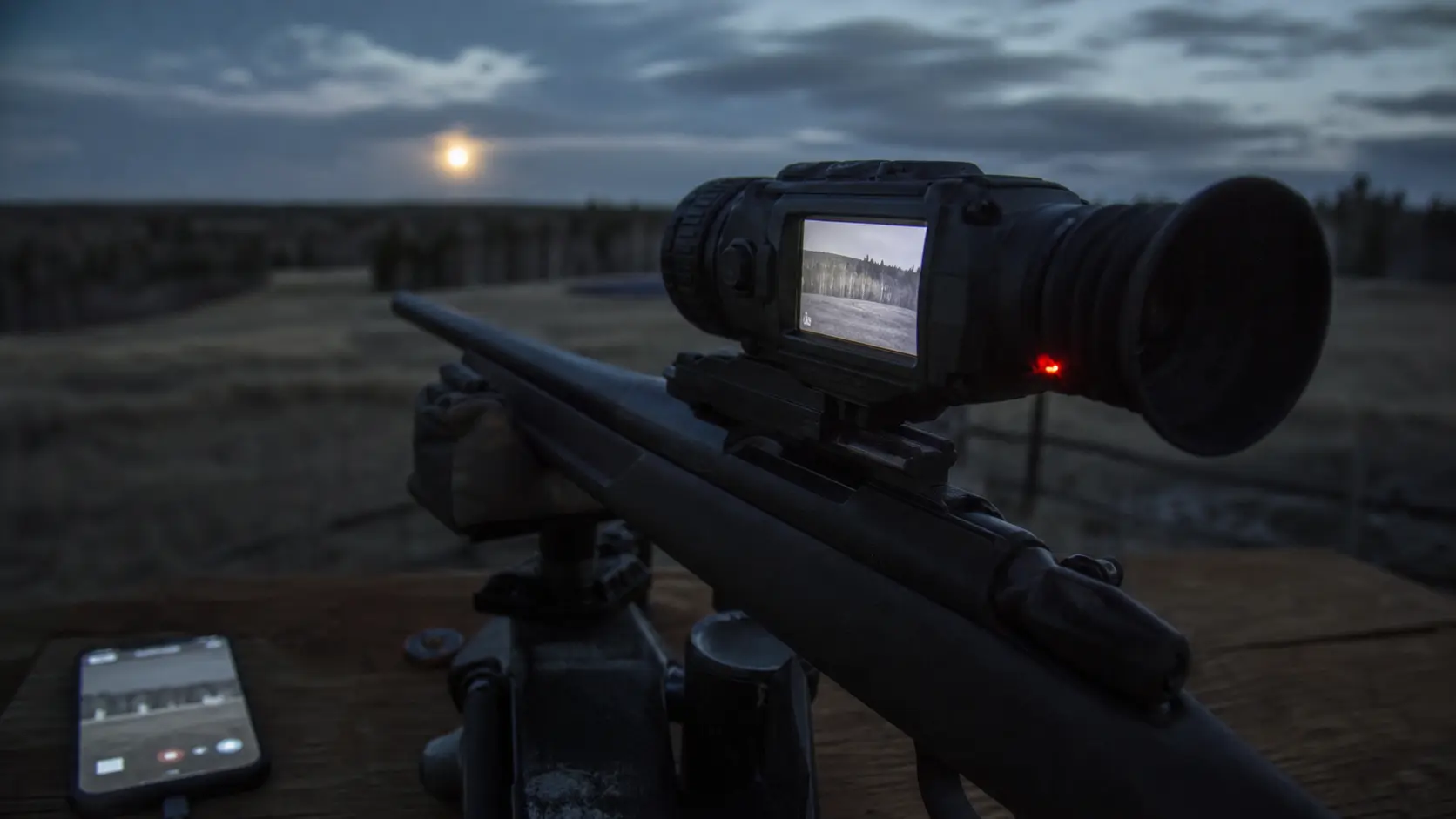
Thermal Scope Video Recording Explained: Wi-Fi, Apps, Storage and Recoil-Activated Video
So, is Thermal Scope Video Recording worth it? The answer is yes.
If you use the footage after the hunt, viewing shots, property records, training a new hunter, sharing thermal hunting video or hog control work, then it is worth the price. This is not as critical if you are just looking to find, identify, and capture animals at night.
That distinction matters. The convenience of a thermal scope that records video does not substitute for longer range of detection, greater level of certainty in identification, zero, ballistic accuracy or good, ethical shot placement. Those jobs are still the sensor’s, the lens’s, the image processing system’s, the mount’s, the shooter’s and the conditions.
My rule is very simple: buy performance of the image first, then the smart features. Two scopes with similar core thermal performance can be differentiated by onboard video, Wi-Fi, a clear thermal scope app, recoil activated video and usable storage. If the sensor quality, control, battery design, or base mag for your terrain is better with the cheaper scope, then I wouldn’t sacrifice that for the ability to record clips.
When is something a video recording on a Thermal Scope?
Product pages often refer to thermal scope recording, which can refer to one or more of the following features:
- Manual video recording: a button or menu item to start and stop a video.
- Video retrieved at the time of firing based on the recoil detected by the scope, depending on the model and setting.
- Photo capture: scope captures thermal images as still photos.
- Audio recording: If the unit has one, it has a microphone built in or allows attaching a microphone for recording audio.
- Live streaming: the scope transmits a live image to a phone or tablet via WiFi and an app.
- File transfer: Download clips via cable, App, Card reader or Internal memory.
Not all smart thermal have all of these. A scope can record video and not audio. It can have Wi-Fi viewing without any app based file management. It might have internal memory without thermal scope SD card slot. It can promote smart features in a product line and the individual model, generation or firmware version can be less capable.
Please refer to the manual of the exact SKU before purchase. Product-page summaries are nice, but typically they’ll tell you how to start recording, where the files are stored, what formats they’re available in and whether RAV is available or not.
What Is Recoil-Activated Video?
When the rifle fires, a recoil activated video thermal scope will save a clip. Technically, the scope detects the recoil impulse and captures images around that time. That can be for a few seconds before the shot, after the shot or both, depending on the manufacturer and model.
The draw becomes apparent. Before the shot, you might not want to be fumbling through the menus on a hog sounder or fast coyote stand. Thermal scope RAV can keep your shot without the hunter having to consider filming.
However, don’t rely on RAV, it can only be a convenience feature. Target ID and backstop awareness, a stable position, and clean trigger press are still required. Also, I suggest to test RAV at the range before relying on it in the field. Check that the recoil detection on your rifle and suppressor configuration, caliber, mount and shooting position are effective. A light re-coiling rifle will act differently than a hard kicking rig, and the way different firmware behavior can differ.
Verify also if RAV is still enabled after power cycles. Some scopes store the setting; others require activation after a reset of the menu, after an update of the firmware or after a change of profile. That fact is significant at 2 a.m.
Video Quality vs Eyepiece Image: Why They May Not Match
The image you see in the thermal scope might not match what you think you saw in the scope. But that isn’t necessarily a sign of a bad scope. It’s not the same viewing experience between the eyepiece and the recorded file.
There are multiple factors that can impact thermal scope footage:
- Different amounts of thermal information are provided with a 256, 384, 640 or higher-resolution sensor.
- The OLED or microdisplay does not provide additional sensor detail but has an impact on what your eye sees inside the scope. To learn more about this distinction, check out this blog post on Thermal Scope Display Resolution Explained.
- Video export resolution: saved file may be downsampled, compressed or recorded at a different resolution than the display.
- Compression – small files are nice, but excessive compression can soften detail.
- Digital zoom: video footage shot at high zoom may appear blocky since digital zoom is simply an enlargement of the existing pixels. Tradeoff is discussed in Thermal Scope Digital Zoom Explained – 2x, 4x, 8x.
- Image palette and setting (contrast, brightness, sharpness, and scene mode) can alter the look of the footage later.
That is why a clip that performs well on a cell phone may not be capable of detecting a coyote at the range a spec sheet states that the scope achieves. Video is good for review and documentation, but should not be the sole tool for assessing performance in the real world. To compare sensor classes, begin with the actual thermal core discussion in Thermal Scope Sensor Size: 256 vs 384 vs 640 vs 1280 and 384 vs 640 Thermal Scope.
The use of wifi and thermal scope apps in the field can be a useful tool or a field distraction.
There’s actually such a thing as thermal scope WiFi that can be helpful. It can allow a buddy to view from the cell phone, capture or download files, facilitate easier firmware updates and assist the shooter during sight-in or training, when another individual can see what he or she sees.
App connectivity, however, can be distracting as well when using thermal scope. Phones glow. Wi-Fi consumes power. App pairing can be finicky in cold weather, when wearing gloves, or when handling calls, wind and animals and rifle position.
The crucial time at which a thermal scope app is most beneficial is either prior to or following the critical moment:
- when putting the equipment together at the bench or truck
- checking settings prior to dark
- when reviewing footage after a stand
- when assisting a new hunter to comprehend what the scope is viewing
- when downloading files at home
The worst use is to attempt to trouble shoot a phone connection when animals are moving. I consider live streaming a secondary feature and not a primary hunting feature. If I am purchasing a thermal scope for a hog hunt, I am interested in the field of view, the base size of the magnification, battery system, sensor class and controls and not so much the slickness of the app.
Storage: Internal Memory, MicroSD Cards, and File Management
Typically the easiest solution is a thermal storage device. You record to the scope, plug in a cable or app later and pull the footage off. The good news is that there will be fewer loose parts. The drawback is when memory is used up, files must be deleted or moved.
If the scope allows, a thermal scope SD card setup might be convenient. Cards can be changed, a reader can be used and hunting can continue without clearing memory. However, there is an additional failure point in the form of card support. Problems can occur with cheap cards, slow cards, dirty contacts or poor formatting.
The following is information about storage that you should take into account before purchasing:
| Storage feature | In the field why it is important |
|---|---|
| Internal memory size | How many clips and photos you can save before cleaning them out. |
| SD/microSD support | Facilitates transfer of files if available and supported |
| File format | Is a key factor for clips to play easily on phone, Mac, PC or editing software. |
| Folder structure | Is important for sorting multiple hunts or multiple stands |
| Delete controls | It is important if memory fills during a hunt |
| USB-C or cable transfer | Faster, and reliable, in some cases, than app transfer. |
My actual tips: clear memory prior to each severe hunt. Avoid arriving with last month’s clips on the scope! When using cards, make sure that they are formatted as the manufacturer specifies and that a ‘known good’ card is stored in your kit.
Recording and Wi-Fi come at a cost when it comes to battery life.
Power consumed by recording, Wi-Fi, live-streaming and display. Some scopes have better performance than others on this, but all these features come at a battery cost.
This is of paramount importance on long winter hunts for predators and all night hunts for hogs. When the scope is used in simple observation mode, acceptable runtime might be OK, but when you add thermal scope live streaming, frequent recording, app pairing, and cold temperatures, runtime may be an issue. If you’re looking for more information about battery planning, check out the Thermal Scope Battery Life Guide 2026.
When it comes to field use I’m thinking in the worst case:
- Use a fully charged scope and external pack (if supported).
- Switch off Wi-Fi if no one requires to view or download.
- Consider using manual recording or RAV, rather than leaving recording on all night.
- Reduce the intensity of the display to an acceptable level without impairing the ability to read the scene.
- Take a cable that does work with the scope in cold.
- Understand if scope is capable of operating during charging or only charging when off.
When one battery and one recording feature are essential to a hunt, your plan is too thin.
The recording of audio can be a great feature or a legal/practical issue.
Using thermal scope audio recording can enhance footage, making it more useful. It records the following: Call sequences, time of shots, communication between hunters, immediate notes of what happened.
It also can cause issues. Audio/video recording laws and expectations are different in different places and circumstances. I can’t give legal advice, but if others might be recorded or the footage will be available to the public, you should be familiar with the rules in the area you hunt.
Not to mention the pragmatic one – audio can record what you do not want to post. Names, property information, location clues, and private conversations can end up in a clip. When recording audio, listen to audio files before posting.
Who really needs thermal scope recording?
The best thermal scope for these hunters is one that comes with video recording:
- Records of sounders, recovery, property work or client communication: Hog control hunters who wish such records.
- Coyote hunters who look at stands, calling time, approach routes and missed opportunities.
- Content creators who want clean thermal hunting videos without the hassle of having to set up a separate camera.
- Guides and trainers who explain with video what a shooter saw and did.
- New thermal users who wish to see animal appearance at various distances and angles.
It is not as important for hunters who don’t save footage often, hunt short sets, or need a reliable heat signature and shot responsibly hunting tool. If so, invest the money in a superior sensor, a superior lens, a superior mount, a superior battery configuration, or a handheld scanner.
Consider additional features like recording, Wi-Fi, and RAV: when it’s worth it.
Don’t pay more for features that you do not need for hunting. That includes the correct base magnification for your terrain, the right sensor class for your needs, a comfortable display, controls that can be used in the dark, and a recoil rating that is right for your rifle. If recoil durability is a factor, check out Thermal Scope Recoil Rating Explained: Caliber and Compatibility before getting caught up in smart features.
When hunting hogs with a thermal scope, recording can be beneficial as sounders tend to run and following up can assist. However, when it comes to hog hunting, sometimes the need is for wide field of view, quick controls and battery life. Consider Best Thermal Scopes for Hog Hunting for application-specific buying context.
RAV can be helpful in a thermal scope for coyote hunting since stands are short and shots occur quickly. However, the clarity of the image, the refresh rate, the focus, and the usable magnification are more important than the ability to take a perfect clip. For the overall predator-hunting spec picture, see Best Thermal Scopes for Coyote Hunting.
Avoid spending extra for smart features that may be at the expense of the basic performance. That’s a lower res scope with great recording, still a lower-resolution scope. Even if you have live streaming, but terrible controls, a scope is still not fun in the dark.
The Spec Checklist: What to compare before buying.
When comparing the smart features of thermal scopes, consider these factors:
- Does the exact model have video recording, photo capture, audio, Wi-Fi and RAV?
- Does it include, offer or not have recoil activated video?
- What is the amount of internal storage?
- Is there SD or microSD support?
- Is it possible to download files via cable, app, card reader or all three?
- Wi-Fi for Live View only or Wi-Fi for Live View and file transfer/settings?
- Does the scope record when powered via external power?
- Is the reticle and on-screen data recorded or just the thermal image?
- What’s the resolution and frame rate of the saved video?
- How easily can you start recording with gloves on?
- Do you have the option to turn the sound off if you don’t want it?
- Is the app compatible with your mobile OS?
- What is the frequency of firmware and app support from the manufacturer?
If it is not provided on the product page, check the manual and/or the seller before making purchase.
Before relying on recording, review the following Field Setup Checklist:
Prior to the first real hunt, try the entire process:
- Recharge the scope, spare batteries, phone, and power bank.
- Empty the internal memory or format the approved card.
- Update date and time for proper sorting of files.
- Check video, photo capture and RAV settings.
- Record and playback a short recording.
- Pair the app in home not in the field for the first time.
- DO NOT leave Wi-Fi turned on after testing if not required.
- Make sure that recording controls are within your reach from your shooting position.
- Determine if firmware updates have altered the way menus operate.
- Don’t forget about target ID and safe shooting basics in the process of filming.
That last bit is no frill. The recording is for the purpose of documenting the hunt. It must never turn into a hunt.
Common Mistakes
The greatest error is to consider the smart features of a thermal scope as evidence of thermal performance. They are not. The weak image is not the stronger image because of recording.
The second error is that of leaving their Wi-Fi on all night and then complaining about the scope’s poor run-time. When battery life is important, control radios, brightness, recording time and external power.
The third error is believing that what is recorded on the screen is what is coming into view through the eyepiece. Later viewing is affected by compression, export resolution, digital zoom and playback screen size.
The fourth error is to purchase a feature by name without verifying the exact generation. Model specific variations may include thermal scope RAV, app support, audio recording, storage size, and file transfer options.
The fifth error is posting videos too soon. If you are posting audio, location, property, or other information that might raise privacy or safety issues, check it out first.
Final Takeaway
Thermal scope video recording can be beneficial if it’s a function you use in your own hunting method. It can be used for shot review, training, documentation, content creation, and to store hog/coyote work. Wi-Fi, apps, internal storage, SD cards, photo capture, audio, live streaming and recoil activated video all can be useful in the appropriate context.
But they are still secondary features. To be a good hunting optic, the scope should be clear for the distances you are using it, usable at the base magnification on your rifle, robust enough to last for many years on your rifle, easy to operate on battery, and simple enough to be used in the dark.
Purchase the thermal performance in the first place. Then opt for the recording system that makes it easier, rather than more difficult, to hunt.
FAQ
Can Thermal Scopes capture video?
Many of today’s thermal imagers capture video; this capability is different among the various generations and models. Some have the option of recording by hand only, some have the ability to capture photos, others have video included that can be recoil activated, audio, and Wi-Fi transfer, and some have an app streaming feature.
What does the term “recoil activated video” mean on a thermal scope?
Recoil-activated video (RAV) is a term for a feature that captures video after the scope has detected a shot. The behavior before and after the shot varies by manufacturer, model, firmware and settings.
Is the thermal scope WiFi better for better images?
No. Thermal scope WiFi is primarily used to connect an app, live viewing, transferring files, or for settings support. It will not enhance detection, identification, zero or ballistic performance.
Do you need a thermal scope app?
Using a thermal scope app is handy, but not necessary. It may be used for streaming, downloading, updating, or setting up, but it should be suitable for use within its scope of control from onboard controls.
How many GB should I use for thermal scope footage?
This is dependent on recording resolution, compression and hunt length. While more memory is always a good thing, it’s not nearly as important as proper file management. Remove old clips before you hunt and check if scope will take SD or micro SD.
Does thermal scope recording affect battery life?
Yes, recording can shorten runtime, notably when used in conjunction with Wi-Fi, live streaming, high display brightness, and cold weather. Consider the actual use plan for batteries, not the best case runtime number.
Is it worth it to purchase a thermal scope for hog hunting that has video recording capabilities?
If you document sounders, property work, recovery or follow up shots, it may be worthwhile. However, other than hog hunting, field of view, sensor quality, controls, battery life and durability should be top priority.
Why should coyote hunters care about RAV?
RAV might be a benefit to coyote hunters since shots can occur rapidly on a hunting stand. Despite this, the core image quality, usable magnification, refresh rate, focus and easy controls should not be neglected in RAV.
Can You Use a Thermal Scope During the Day? Daylight Use/Sun Safety and Zeroing Tips.
Night Vision Range Explained: Detection, Recognition, Identification, and Real Hunting Distance
How to Set Up an IR Illuminator for Night Vision: Placement, Beam Width, and Field Mistakes